Friday, October 30, 2009

Best paper Award

hi all,

Happy to inform you all that my Research paper has got 2nd "Best Paper Award" at Artcom 2009 international Conference ,held at Kottayam Kerala.


1st and 3rd place by IIT Kharagpur.

http://www.icartcom.com/

B.Surendiran, Y.Sundaraiah, A.Vadivel, "Classifying Digital Mammogram Masses using Univariate ANOVA Discriminant Analysis ",International Conference on Advances in Recent Technologies in Communication and Computing - ARTCom 2009, IEEE,Oct 2009. (Best Paper Award)
IEEE Link
ARTCOM 2009 Report
To Download from IJRTE journal

This paper is cited at http://www.breast-cancer.ca

Thursday, October 22, 2009

Will Black background save power.....?

Hi,

http://www.blackle.com/ is a customized google search engine with black background to save energy.

The concept behind is CRT monitors uses less energy in displaying black pixels than displaying white pixels. So using black background for web pages, ultimately reduces power consumption by CRT monitors.

The energy saved by using black google is around 750 Megawatts hours a year as per blackle.com.

More details can be found at below sites,
http://en.wikipedia.org/wiki/Blackle.com
http://www.blackle.com/about/

Monday, August 10, 2009

Create Cartoon character from your photo

This article gives you a simple and easy method to convert your photo into a cartoon character.
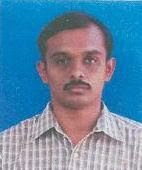


Original Image


Cartoonised Image


For this you have to download a freeware plug-in, which can be used with photoshop, Irfanview, Imageready, and other most popular photo editing software.

Download simplifier plug-in from any of the below links
http://photoshop.pluginsworld.com/plugins/adobe/1114/amphisoft/simplifier.html

http://www.top4download.com/simplifier/ddxhvenh.html

Extract the files from simplier.zip

copy the SimplyFair.8bf file into plug-ins folder of the image editing software .
For Photoshop - C:\Program Files\Adobe\Photoshop 6.0\Plug-ins
For Photoshop CS2- C:\Program Files\Adobe\Adobe Photoshop CS2\Plug-Ins\Effects
For Irfanview - C:\Program Files\IrfanView\Plugins\Adobe 8BF
Example,
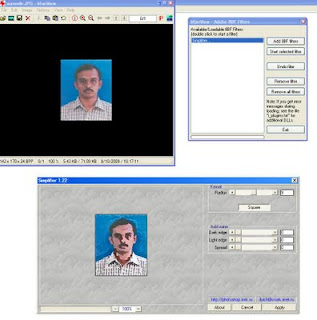
Open the image in the irfanview,
irfanview -> image menu-> effects ->Adobe 8BF filters->add 8BF filters (select the simplier folder) -> start selected filter -> set radius as 7


Related searches:
create cartoon character of yourself,  create cartoon character online, create anime character.create your own cartoon character,create cartoon avatar,simpsonize me,cartoon me